
Home · collaborator mode
The first thing the person sees
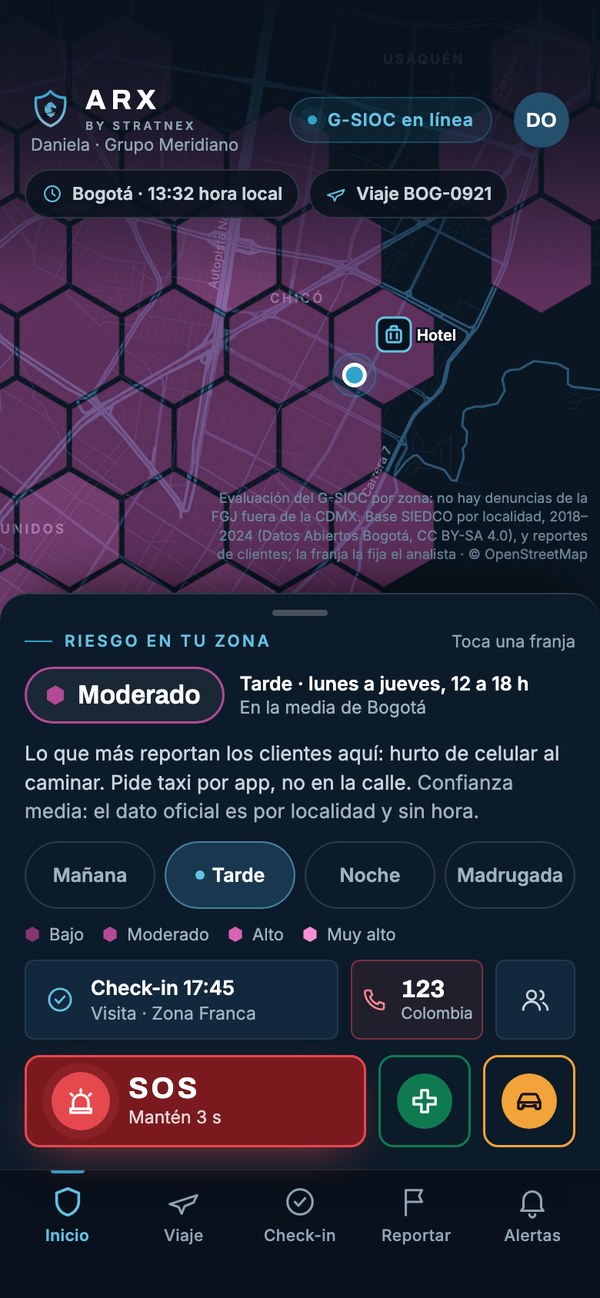
Daniela is travelling to Bogotá. Her home screen asks nothing: it shows the risk where she is, at the hour it is, and keeps help at the bottom, always in the same place.
Each division works on its own or as part of an integrated architecture designed around your specific exposure.
View the full portfolio The G-SIOC corporate appCorporate application · connected to the G-SIOC
The G-SIOC in each person's phone: a button that opens a channel with an operator, the risk of the place where they are, and the evidence that later sustains the case.
iPhone and Android. No in-app purchases: the organisation activates the modes it contracts.
What it is
Corporate security programmes tend to fail at the same point: the interval between the moment something happens and the moment someone able to decide finds out. ARX exists to close that interval.
It is an application the organisation issues to its people. It is not sold from inside and has no open sign-up: the administrator registers each person, activates the mode matching their role and defines what the company sees and when.
What sets it apart is not the button. It is what lies on the other side: every alert reaches a G-SIOC cabin with an operator who answers, accompanies and, where appropriate, links with the emergency centre of the city where the person is.
7
operating modes the administrator activates by user type
3 s
holding the button: no accidental taps, no menu to choose from
5 s
between one position and the next while an alert is active
24/7
G-SIOC operators behind every alert, not a mailbox
Seven modes, one app
The administrator defines which mode the app opens in for each user type. The three help buttons are the same in all of them: what changes is the context the operator receives.
Leadership and officers exposed by their position
The home screen shows the estimated risk around the person according to the hour and the day. Holding the button for three seconds opens a channel with the G-SIOC: live location, chat, voice and, if needed, camera with a paramedic from the centre.
Executive protection details
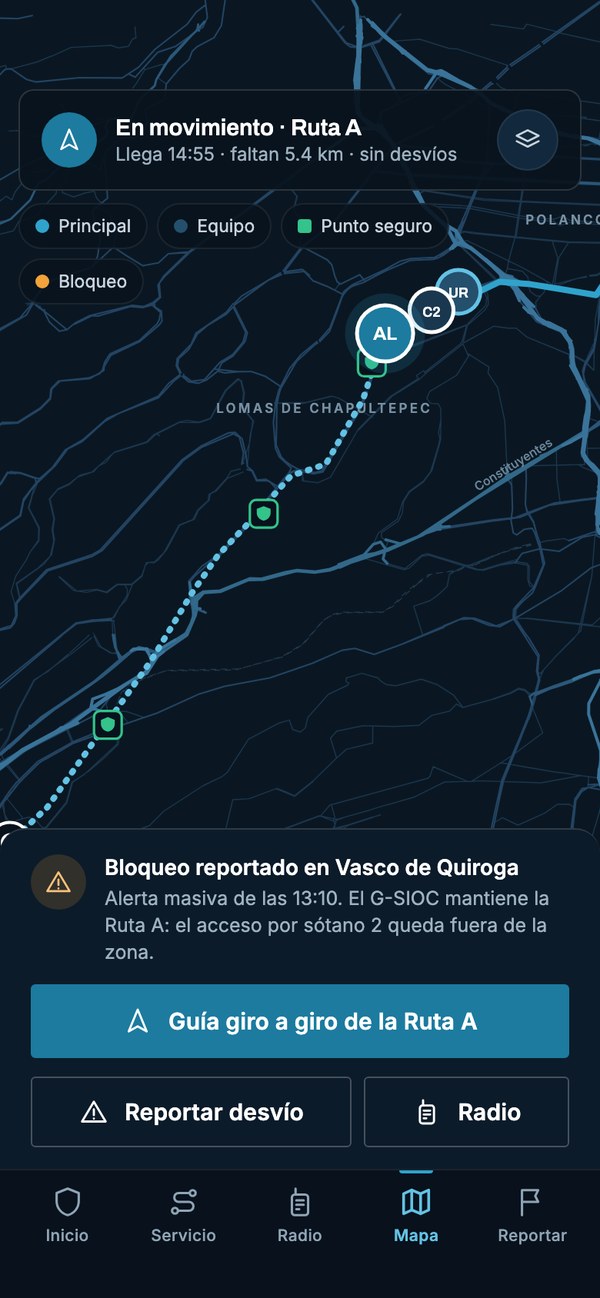
The whole assignment in the team leader's phone: the day's itinerary, the team with their vehicles and the route protocols — alternate route, safe points and nearest hospital to the destination. Status codes are reported with one tap and stay in the log.
Guard staff at a plant, office or branch
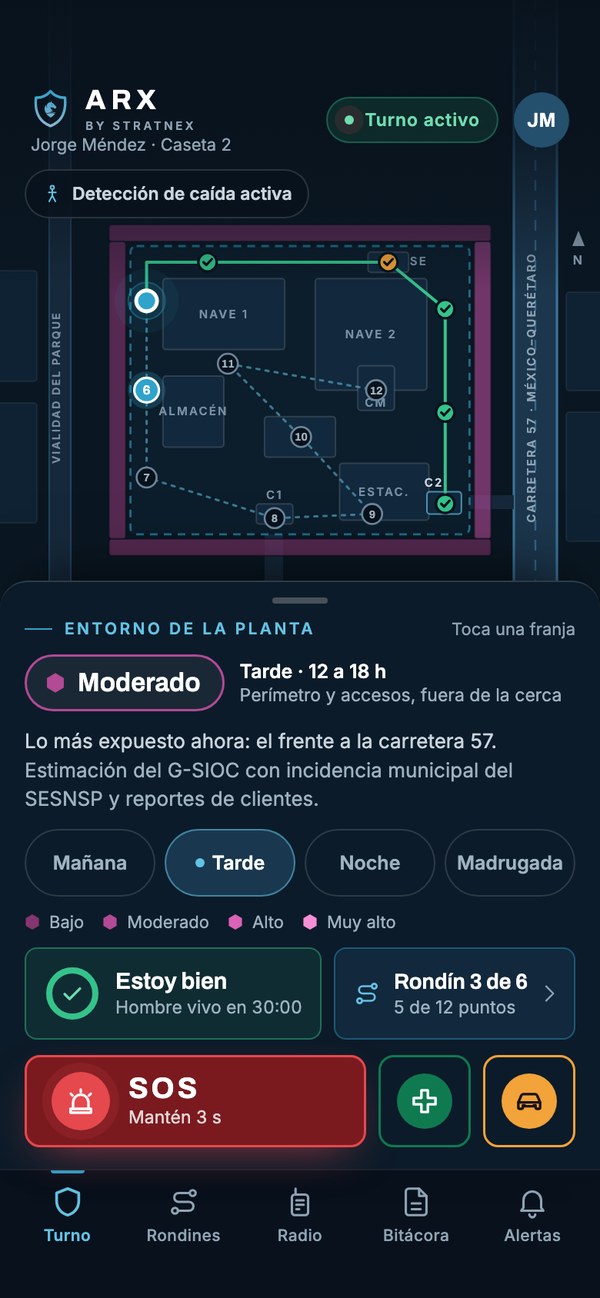
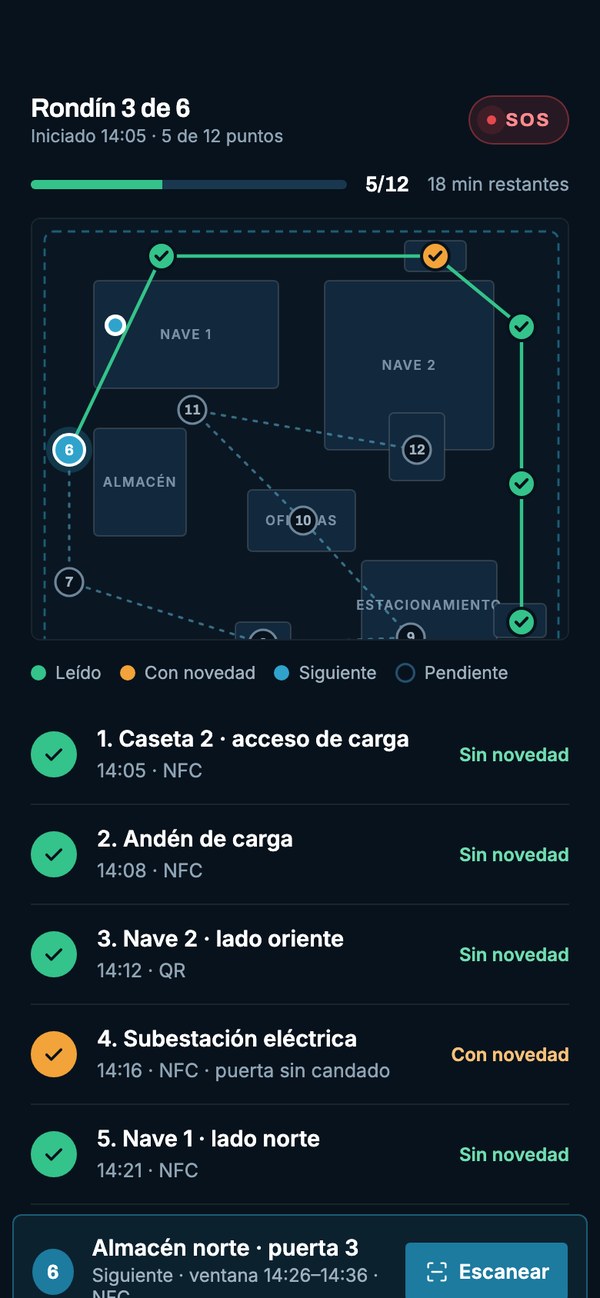
A shift with periodic confirmation that the person is well, fall detection and the risk of the site's surroundings, not that of the whole city.
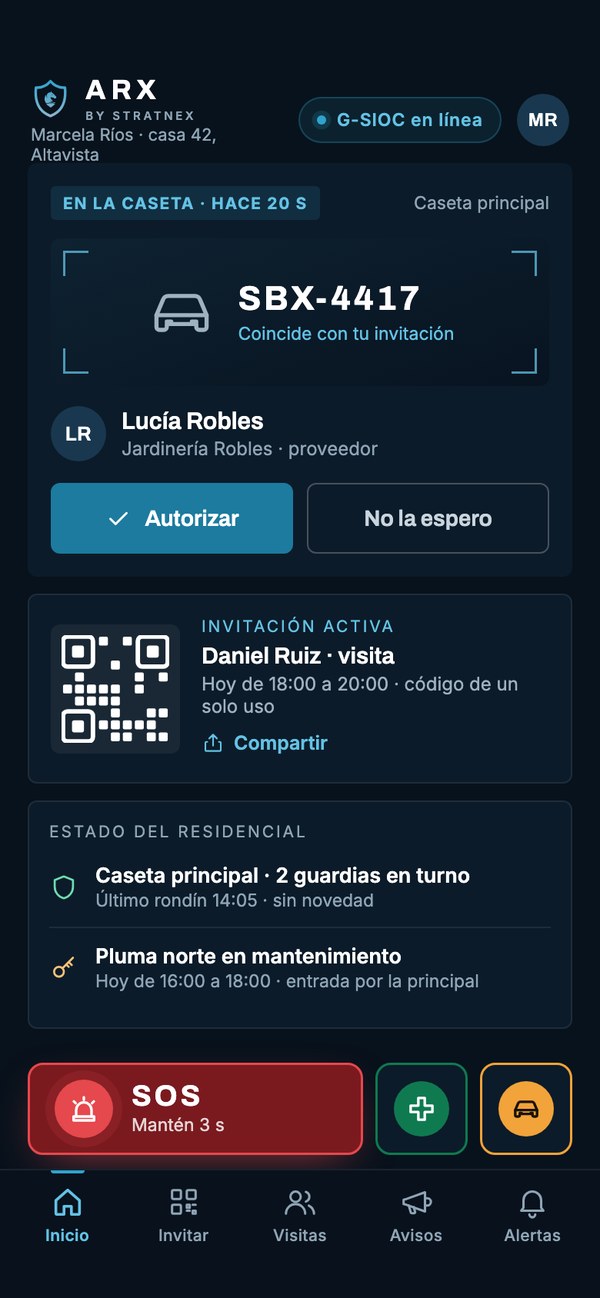
Gated communities and residential complexes
The community's access control, seen from the phone of the person who lives there. When a visitor reaches the gate, the app shows who they are and in which vehicle, and the resident authorises or not from wherever they are. The gatehouse executes; it does not decide on its own.
Staff on business travel or at a branch
Before the trip, the country briefing produced by the G-SIOC, which separates its own assessment from other governments' official advisories. During the trip, the risk of the area at local time and the country's emergency number one tap away, verified and available offline.
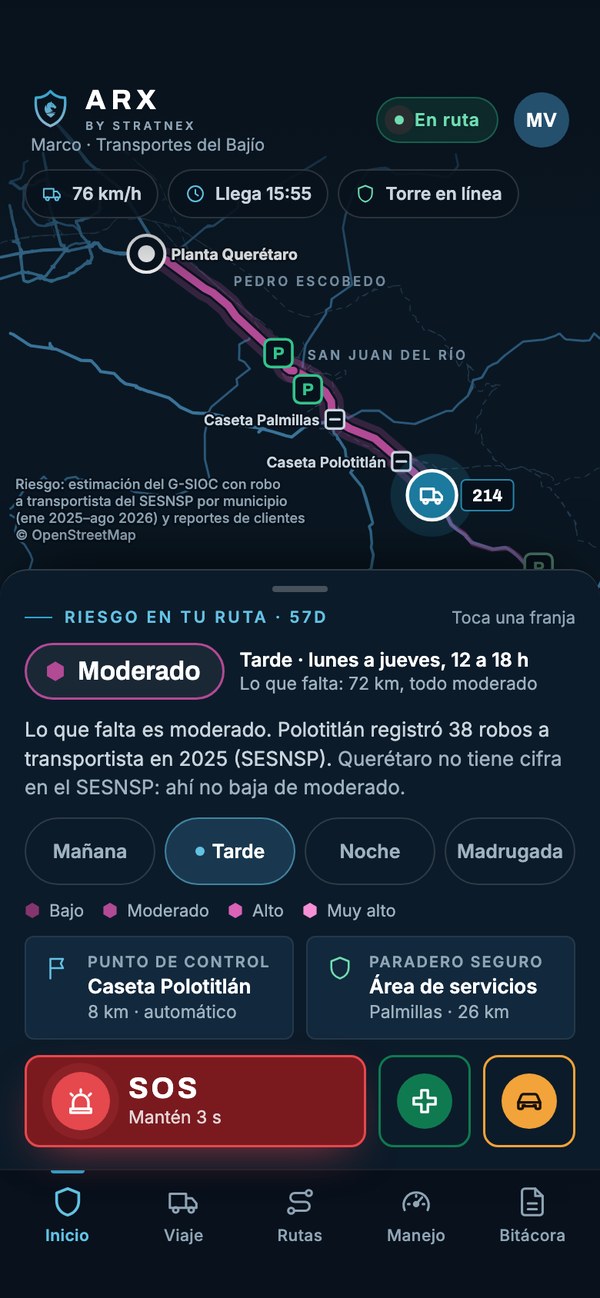
Vehicle operators and control towers
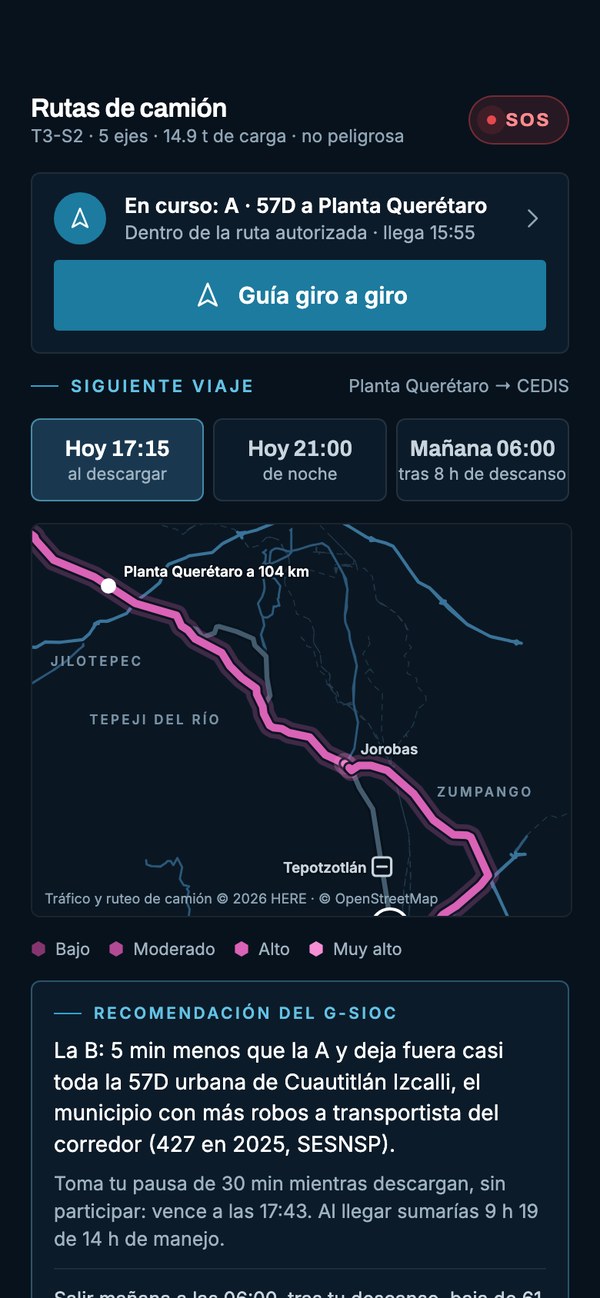
The risk of the remaining route is estimated with SESNSP cargo theft figures by municipality, and the screen marks the next control point and the nearest safe stop. While moving it is read-only: warnings go by voice.
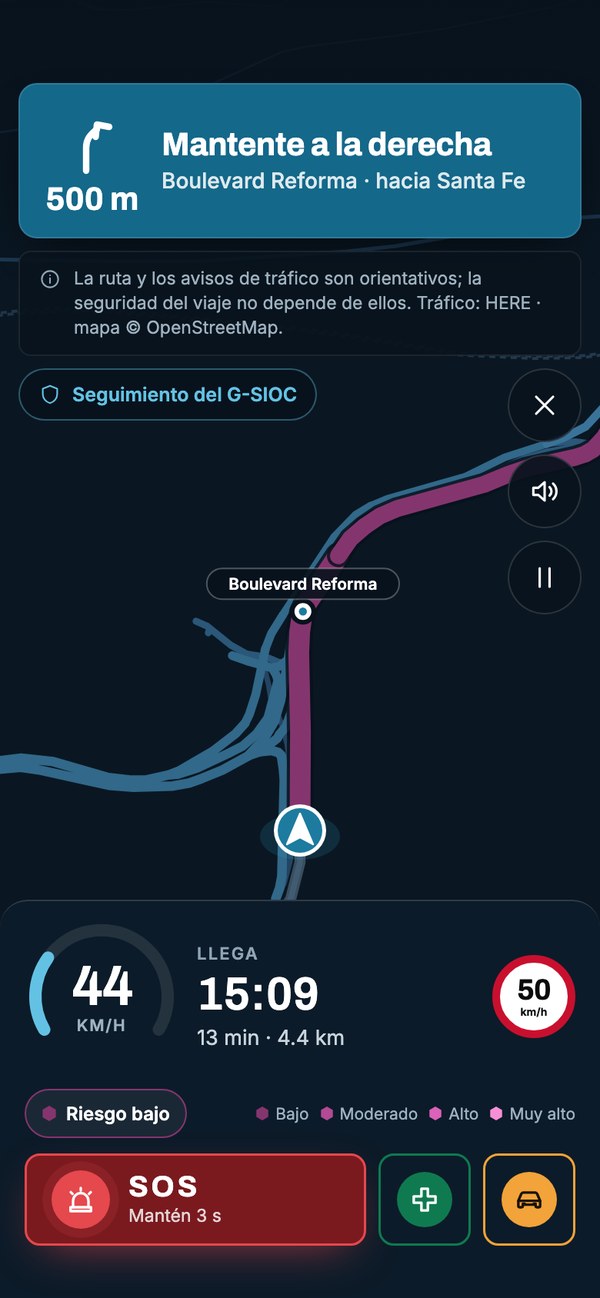
Cross-cutting: it turns itself on when the person drives
Speed, the stretch's limit and voice warnings. Turn-by-turn guidance paints each stretch according to the risk estimated for the hour it will be driven, and keeps working from the stored map when the phone loses the network.
The screens correspond to the demonstration environment, with fictitious organisations and people.
Try it
These are the app's own screens. The help button is held for three seconds, exactly as it is on a person's phone.
A demonstration with a fictitious organisation and person. No tap sends a real alert.
Tap any marked point on the screen.
Home · collaborator mode
Daniela is travelling to Bogotá. Her home screen asks nothing: it shows the risk where she is, at the hour it is, and keeps help at the bottom, always in the same place.
Home · collaborator mode
The app says whether the cabin is online before anything happens. If the G-SIOC were not answering, you would know it here and not when asking for help.
Home · collaborator mode
The centre of the screen holds the risk of the area where the person is, not a siren. Help occupies the bottom strip, identical in every mode.
Home · collaborator mode
Each card says what is reported in that area, with what confidence and from which official data. Here, in Bogotá: open data by locality — with no hour — and client reports.
At the G-SIOC: Official crime reports, client reports and the centre's own alerts feed the same map.
Home · collaborator mode
Risk changes with the hour and with the day. Tapping a band shows the estimate for that moment, which is the one that helps decide when to leave or return.
Home · collaborator mode
One tap says she arrived safely. If it does not come, the app does not stay quiet: reminder, question from the G-SIOC at ten minutes, call at twenty, notice to the company at thirty and location protocol at forty-five.
At the G-SIOC: The operator sees who has not confirmed, in which city and since when.
Home · collaborator mode
Emergency numbers change with the country. The G-SIOC verifies them with a date and they work offline; here, Colombia's 123, with the phrase for dictating the location to the operator.
Home · collaborator mode
The same gesture, a different context. The operator receives the person's medical profile and can open a camera with a paramedic from the centre.
Home · collaborator mode
For a breakdown or an incident with no injuries. It reaches the same operator, with the location and the vehicle details.
Active alert · open channel
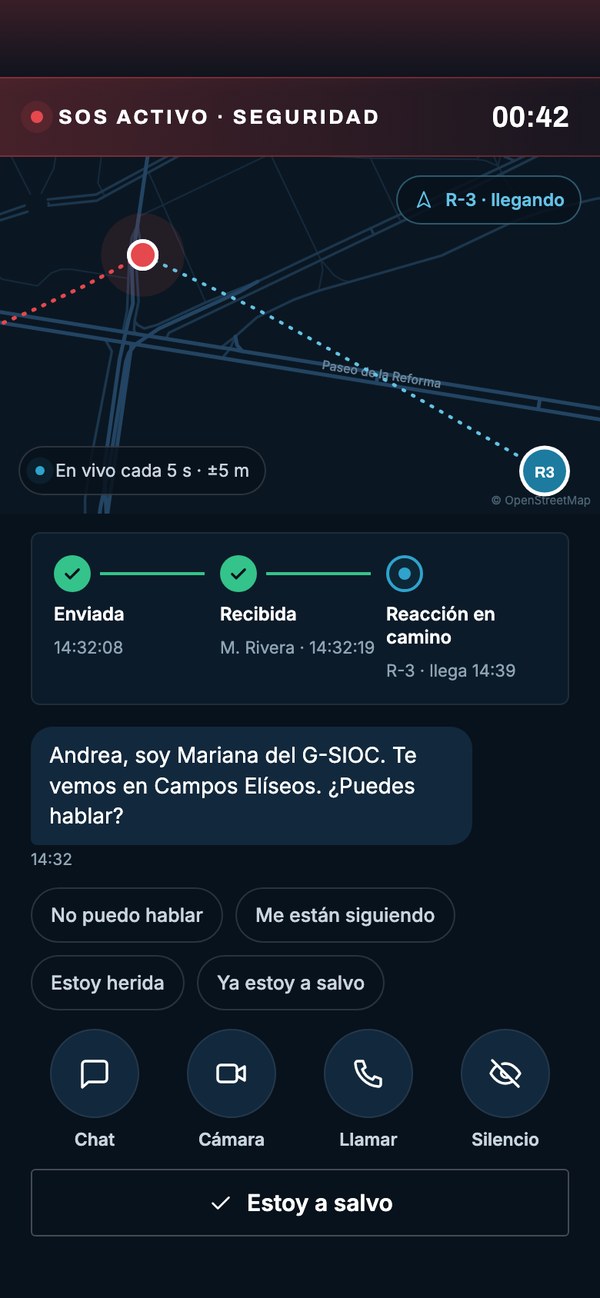
Three seconds held and the case is already in a G-SIOC cabin, with the live location and the person's profile. Nothing had to be chosen and nothing had to be explained.
At the G-SIOC: The alert heads the operator's queue with the location, the battery, the organisation and the medical profile.
Home · collaborator mode
That is exactly what happens in a pocket or a backpack: released early, nothing goes out. Hold it again to see what happens when it does.
Active alert · open channel
The screen says since when the alert has been active. Nothing that follows depends on the person being able to speak.
Active alert · open channel
The position arrives with its stated accuracy. If the phone loses signal, the operator keeps the last position and its time.
Active alert · open channel
The person sees the real progress: at what time the operator received it, who took it and when the unit arrives. Without that, waiting is the hardest part.
At the G-SIOC: The same status is recorded in the case file, with its time.
Active alert · open channel
One-tap replies for when speaking or typing is not possible: “I can't talk”, “I'm being followed”, “I'm injured”.
Active alert · open channel
Text and voice notes. The G-SIOC receives them transcribed, to read when listening is not possible.
Camera with the G-SIOC
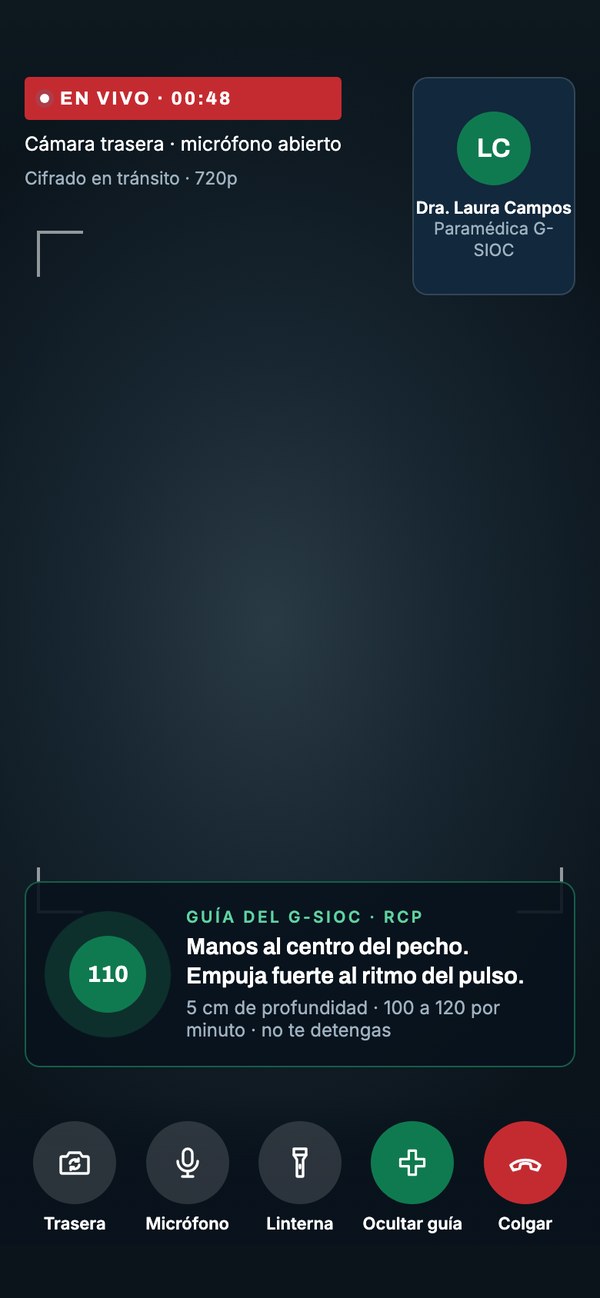
If someone is injured, the person shares encrypted camera and microphone with a paramedic from the centre. This is how it looks on the other side.
Active alert · open channel
The call reaches the cabin that already has the case open, not a switchboard that asks the same questions again.
Active alert · open channel
It turns off tones and vibration without closing the alert, for when drawing attention is precisely what must be avoided.
Active alert · open channel
It closes with their PIN: nobody else can cancel it, neither the company nor the operator. And if someone forces them to close it, the duress PIN shows this same screen while the location keeps arriving, silently.
At the G-SIOC: With the duress PIN the protocol switches to “listen only”: nobody calls or writes to the person.
Active alert · open channel
From here the location travels every five seconds and an operator has the case. Tap the elements on the screen to see what each one does.
Camera with the G-SIOC
The session is handled by clinical staff from the G-SIOC, identified by name. The person always knows who they are talking to.
Camera with the G-SIOC
The paramedic sends the manoeuvre with its rhythm and its depth, to follow while help arrives.
Camera with the G-SIOC
Rear or front camera, microphone, torch and hang up. The stream stops whenever they want, and the alert stays open.
Camera with the G-SIOC
The stream is encrypted and the person controls it. On the other side there is clinical staff from the centre, not an operator improvising.
When something happens
Six behaviours that do not depend on the mode or on the person remembering a protocol.
Three fixed buttons — help, medical emergency and roadside assistance — present in every mode. They are held for three seconds and, released earlier, they cancel. What changes between modes is not the button: it is the context the operator receives.
The alert opens chat and voice and, if the person authorises it, encrypted camera and microphone. A G-SIOC paramedic can guide a manoeuvre on screen while help arrives.
Closing the alert under threat produces a screen identical to a normal closure. In the G-SIOC the case changes protocol, nobody contacts the person and the location keeps coming.
ARX detects the impact through the accelerometer and counts thirty seconds before notifying. On iPhone 14 or later it can receive Apple's Crash Detection and, in that case, it calls the G-SIOC cabin: no app can dial 911 by itself.
The G-SIOC drafts an alert for whoever is now within a radius, with the severity and channels it chooses. Each person answers with one tap, and whoever asks for assistance opens their own alert with chat.
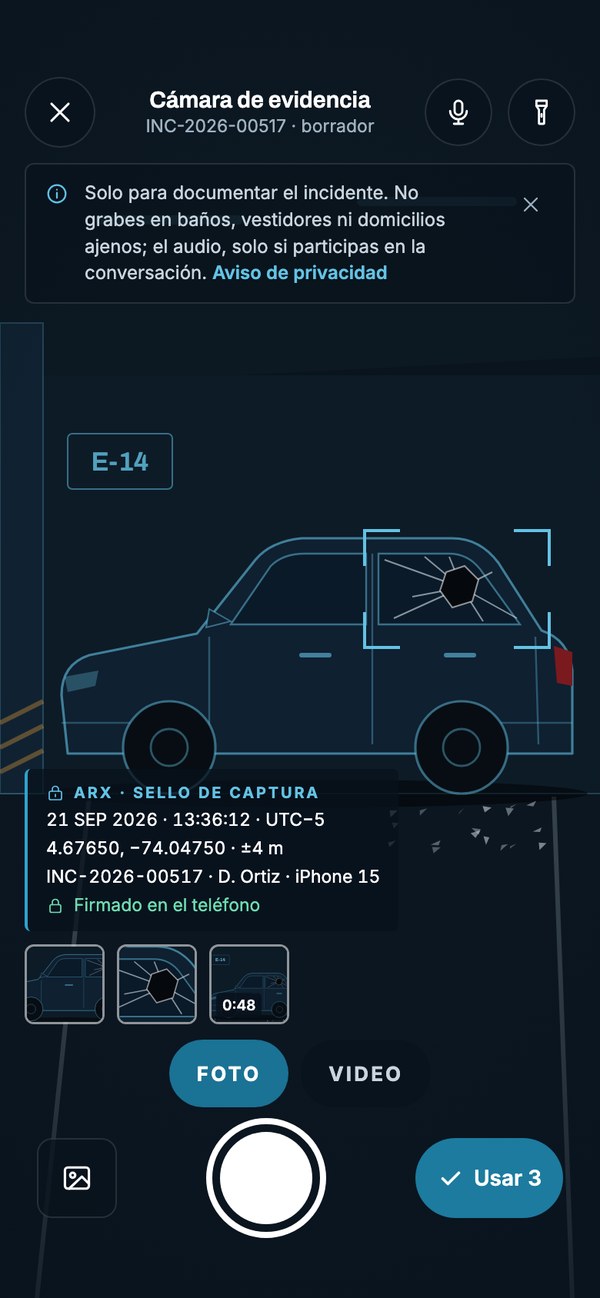
Every photo or video carries the time, GPS with its margin, a reference number and the phone's signature, plus a SHA-256 hash computed on the device. When the case closes, the NOM-151 certificate is issued; the copy for sharing goes out without location data and watermarked.
Risk, routes and driving
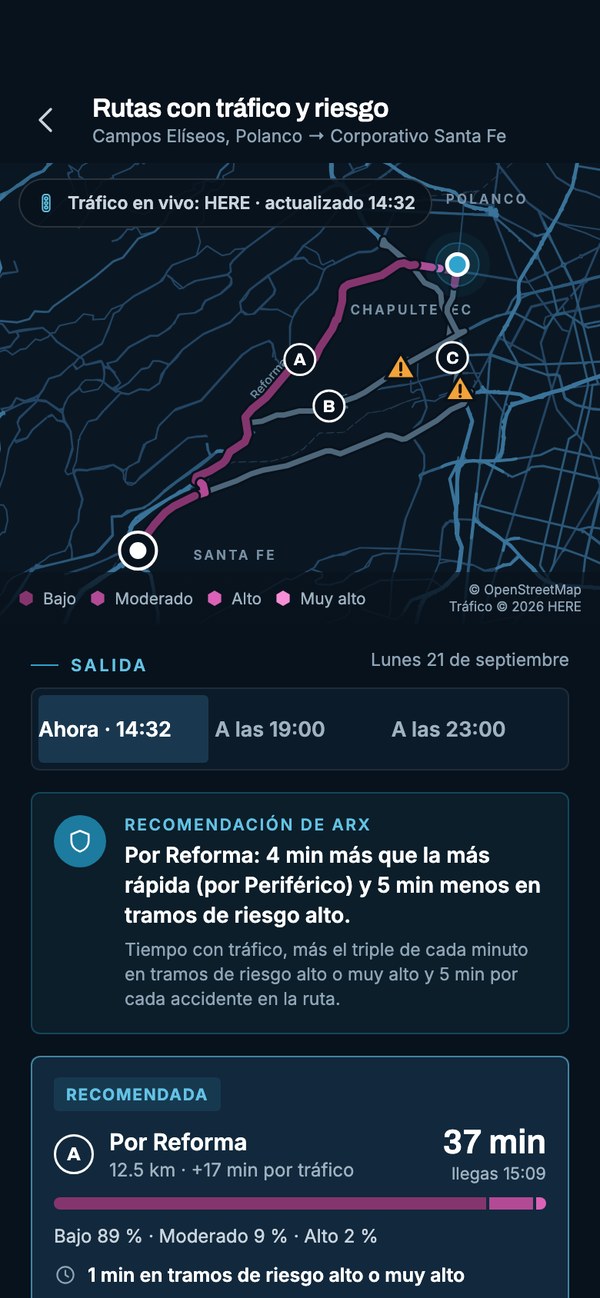
Risk is estimated by area, time band and day of the week, with official open data — the Mexico City Prosecutor's crime reports and SESNSP cargo theft by municipality — plus clients' reports and the G-SIOC's own alerts. The app states where each estimate comes from and with what confidence, because a number without a source is of no use for deciding.
On top of that layer, the planner crosses live traffic with the risk of each stretch at the hour it will be driven. It does not always recommend the fastest route: it recommends the one that spends fewer minutes on high-risk stretches, and explains the difference in minutes.
Alternatives are also compared by departure time. In cargo, moving the departure usually changes the result more than changing the route.
How it is deployed
ARX Corporate has no open sign-up and no payments inside the app. The administrator registers each person and assigns their modes.
Single sign-on with the organisation's identity provider. ARX never sees or stores the password, and a personal account does not open the corporate app.
Which modes are contracted, which one the app opens in for each user type and which risk, driving, crash and check-in policies apply.
Whoever leads a protection detail and also travels as a collaborator switches mode from their profile, without installing anything different.
Deactivating closes the sessions and stops location sharing at once. The log of what happened is preserved.
Alerts, tracking and evidence reach the G-SIOC case file, which coordinates with the client and with local authorities where appropriate.
Stated limits
A protection service is also judged by what it refuses to promise.
It leaves the number ready for the person to confirm, or the G-SIOC links with the appropriate emergency centre. The exception is the iPhone's Crash Detection, which calls on its own.
The G-SIOC accompanies, documents and coordinates. The public response is given by each city's institutions, and the app does not stand between the person and them.
Outside a tracking window or an active alert, the app sends no position. And it states on screen what the company sees, when it sees it and what each permission is for.
ARX does not execute an engine stop or change an authorised route. It proposes, records and notifies; the decision belongs to a person.
The route and the traffic warnings are indicative, and the screen itself says so. The help button does not depend on them or on having a signal.
Getting started
Which roles are included, with which modes and in which countries. From there come the initial roster and the policy for each user type.
Registration with the organisation's identity provider and connection with the G-SIOC: protocols, escalations and contacts verified by country.
One session per user type, short and operational: when the button is held, what a duress PIN is and what the company sees.
A real exercise with the G-SIOC before the programme is considered installed. A protocol that has not been tested is not a protocol.
Next step
We are available to address any enquiry or project with the utmost confidentiality and professionalism. Contact us for an exploratory meeting.